network-ai · Examples
Runnable demos that show the core features in under five minutes.
Single entrypoint:
npm run demoOptional flags:
npm run demo -- --07
npm run demo -- --08
npm run demo -- --both
npm run demo -- --both --silent-summary
examples/
01-hello-swarm.ts ← three agents passing work through a blackboard (no API key)
02-fsm-pipeline.ts ← FSM governance (state-based access control) (no API key)
03-parallel-agents.ts ← parallel agents + four synthesis strategies (no API key)
04-live-swarm.ts ← 10-agent live AI research swarm (3 parallel waves + synthesizer) (OPENAI_API_KEY required)
05-code-review-swarm.ts ← 5-agent AI code review swarm, 4 modes (OPENAI_API_KEY required)
06-ai-pipeline-demo.ts ← 6-agent AI delivery pipeline (OPENAI_API_KEY required)
07-full-showcase.ts ← full feature showcase (security + quality loops) (OPENAI_API_KEY required)
08-control-plane-stress-demo.ts ← control-plane stress demo (locks/FSM/compliance) (no API key)Examples 01–03 run without any API key. 04 and 05 call the OpenAI API — copy .env.example to .env and add your key before running them.
Prerequisites
# from the repo root
npm install
ts-node is already in devDependencies, so
npx ts-nodeworks out of the box.
01 · Hello Swarm
Three agents (Researcher → Analyst → Reporter) pass tasks through a shared blackboard. Shows identity-verified writes, namespace scoping, and orchestrator-managed delegation.
npx ts-node examples/01-hello-swarm.tsWhat you'll see
- Each agent writes to a different namespace (
research:,analysis:,report:) - Agents only see blackboard keys their namespace allows
- Final report assembled from the blackboard snapshot
02 · FSM Pipeline
A JourneyFSM governs a six-state workflow. The demo walks through the full pipeline while deliberately triggering blocked transitions and blocked tool calls so you can see the compliance layer in action.
npx ts-node examples/02-fsm-pipeline.tsWhat you'll see
- ✅ Authorized agents acting in the right state
- 🚫 Unauthorized agents blocked
- 🔒 Unauthorized tool calls blocked (even for authorized agents)
- 📋 Full transition history with timestamps
03 · Parallel Agents
Three specialist agents run concurrently (sentiment, keywords, summary) and their results are combined using all four built-in synthesis strategies: merge, vote, chain, and first-success.
npx ts-node examples/03-parallel-agents.tsWhat you'll see
- All three agents execute in parallel (~320 ms wall-clock)
- Side-by-side output for each synthesis strategy
- A second run demonstrating blackboard result caching (near-zero latency)
Running all examples
npx ts-node examples/01-hello-swarm.ts
npx ts-node examples/02-fsm-pipeline.ts
npx ts-node examples/03-parallel-agents.ts
npx ts-node examples/08-control-plane-stress-demo.ts

# 05 requires OPENAI_API_KEY in .env
npx ts-node examples/05-code-review-swarm.ts
05 · Code Review Swarm
A 5-agent swarm (Security, Performance, Reliability, Testing, Architecture) reviews code or documents in parallel, then a coordinator synthesizes the findings and a fixer agent applies them. Requires OPENAI_API_KEY.
# Setup (one time)
cp .env.example .env        # then add your key inside .env

# Run
npx ts-node examples/05-code-review-swarm.ts
4 modes at launch:
| Mode | Prompt | Output |
|---|---|---|
[1] Built-in | Reviews the bundled auth-service.ts | Fixed .ts file |
[2] Paste code | Paste your own source (ends with end) | Fixed .ts file |
[3] System design | Paste a design/architecture doc | Revised .md file |
[4] Custom role | Define your own reviewers for any content | Revised .md file |
Output files are saved to examples/output/. See the YouTube demo for a walkthrough.
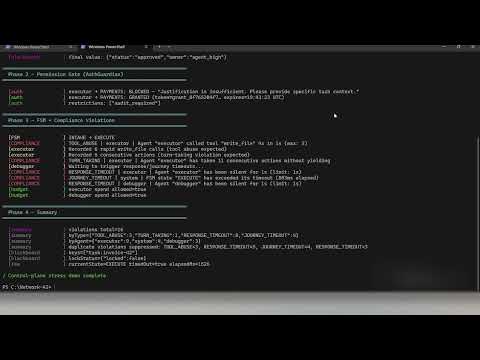
08 · Control-Plane Stress Demo
No API key required. Proves every guardrail in ~3 seconds.
npx ts-node examples/08-control-plane-stress-demo.ts
10 · NemoClaw Sandbox Swarm
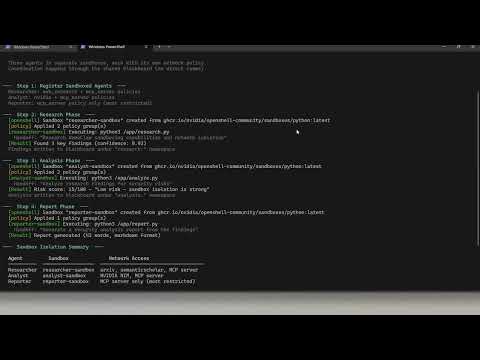
No API key required. Three agents in isolated NVIDIA NemoClaw sandboxes with deny-by-default network policies.
npx ts-node examples/10-nemoclaw-sandbox-swarm.ts
Next steps
| Goal | Starting point |
|---|---|
| Connect a real LLM | Replace any registerHandler body with an openai.chat.completions.create(...) call |
| Add a framework adapter | import { LangChainAdapter } from 'network-ai' and pass it to createSwarmOrchestrator |
| Persist the blackboard | The blackboard already writes to swarm-blackboard.md — inspect it after a run |
| Add type-safe agents | Copy an adapter from adapters/custom-adapter.ts and extend BaseAdapter |